
If you are just starting your journey into Artificial Intelligence (AI), you may have heard terms like Vector Database, Embeddings, Semantic Search, and RAG.
At first, these terms can sound complicated. But don’t worry.
Let’s understand Vector Databases through a simple story—without complicated mathematics or technical jargon.
 Meet Ravi and His Supermarket
Imagine there is a supermarket called Ravi Mart. Ravi has 50,000 products in his store.
One day, a customer walks in and says: “I want something that will help me sleep better.”
Ravi looks at his products:
- Chamomile tea
- Lavender oil
- Herbal tea
- Sleep mask
- Relaxation candles
- Magnesium supplements
The interesting thing is that none of these products may contain the exact words “help me sleep better”. A traditional search system might struggle. But Ravi has a smart AI assistant. The assistant understands what the customer actually means.
It thinks: “The customer is looking for something related to sleep and relaxation.”
It immediately identifies:
Chamomile Tea → Lavender Oil → Sleep Mask
This is the basic idea behind a Vector Database.
 So, What Is a Vector?
Let’s take a simple sentence: “I love eating pizza.”
An AI model can convert the meaning of this sentence into a collection of numbers.
For example:
[0.21, -0.45, 0.78, 0.12, …]
Don’t worry about the actual numbers.
Think of them as a GPS location for the meaning of the sentence.
For example:
“I love eating pizza.”
might be represented somewhere around:
Food → Italian → Pizza → Enjoyment
Now consider:
“Pizza is my favorite food.”
Its numerical representation would probably be close to the first sentence because both sentences have a similar meaning.
But, “I bought a new car.” would be represented somewhere very different.
So remember this simple rule:
Similar meaning → Similar location
Different meaning → Different location
That is the foundation of vector databases.
 Imagine a Giant Map of Information
Imagine that all the information in the world is placed on a giant map. Information with similar meanings is placed close together. For example:
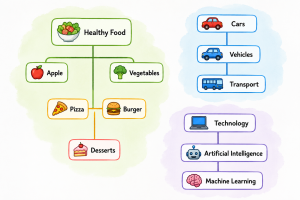
Of course, computers don’t actually create a map like this that you can see. Instead, an AI embedding model converts information into numerical vectors.
Those vectors represent the meaning of the information.
🗄️ Now Enter the Vector Database
Imagine Ravi has millions of pieces of information. He needs somewhere to store all these numerical representations. That’s where a Vector Database comes in.
A traditional database might store information like:
| Product | Category | Price |
|---|---|---|
| Pizza | Food | ₹300 |
| Laptop | Electronics | ₹50,000 |
| Shoes | Fashion | ₹2,000 |
A vector database can store information along with its vector representation:
| Information | Vector |
| “I love pizza” | [0.21, -0.45, 0.78...] |
| “Pizza is delicious” | [0.19, -0.43, 0.80...] |
| “I bought a laptop” | [0.71, 0.12, -0.32...] |
The important part is not the actual numbers. The important part is that similar information tends to have similar vectors. A vector database is specially designed to quickly find vectors that are similar to another vector.
🗄️ Now Enter the Vector Database
Imagine Ravi has millions of pieces of information.
He needs somewhere to store all these numerical representations.
That’s where a Vector Database comes in.
A traditional database might store information like:
| Product | Category | Price |
|---|---|---|
| Pizza | Food | ₹300 |
| Laptop | Electronics | ₹50,000 |
| Shoes | Fashion | ₹2,000 |
A vector database can store information along with its vector representation:
| Information | Vector |
| “I love pizza” | [0.21, -0.45, 0.78…] |
| “Pizza is delicious” | [0.19, -0.43, 0.80…] |
| “I bought a laptop” | [0.71, 0.12, -0.32…] |
The important part is not the actual numbers.
The important part is that similar information tends to have similar vectors.
A vector database is specially designed to quickly find vectors that are similar to another vector.
🔍 Let’s See What Happens When You Ask a Question
Imagine your company has a knowledge base containing 100,000 documents.
You ask an AI chatbot:
“How many days of leave can an employee take?”
What happens behind the scenes?
Step 1: Your Question Is Converted Into a Vector
An AI embedding model converts your question into numbers.
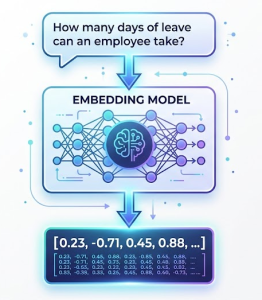
The vector represents the meaning of your question.
Step 2: The Vector Database Searches
The vector database looks at the stored vectors and asks, “Which pieces of information have meanings closest to this question?”
It might find:
- Employee Leave Policy
- Annual Leave Rules
- Sick Leave Policy
These documents are probably much more relevant than documents about salaries, office locations, or IT policies.
Step 3: The Relevant Information Is Returned
The relevant documents are provided to the AI. The AI can now generate an answer such as: “According to the company leave policy, employees are entitled to 20 days of annual leave.”
This is one of the most important applications of vector databases in Generative AI.
🤔 Why Can’t We Just Use Traditional Search?
This is an important question.
Suppose your company document says, “Employees are entitled to 20 days of annual vacation.”
But you ask, “How much holiday can I take?”
Notice the difference:
Question: Holiday
Document: Vacation
The words are different, but the meaning is similar. Traditional keyword search mainly looks for matching words. A vector-based search looks for similar meaning.
Therefore, it can understand relationships such as:
Holiday ≈ Vacation ≈ Leave
This is called semantic search.
🧠 Where Does ChatGPT or an LLM Come Into the Picture?
Now let’s imagine that you are building an AI chatbot for your company. Your company has thousands of documents:
- HR policies
- Project documents
- User manuals
- Product documentation
- FAQs
- Training material
- Technical documentation
You don’t want the AI to memorize all these documents. Instead, you can create a smart digital library using a vector database. The process looks roughly like this:
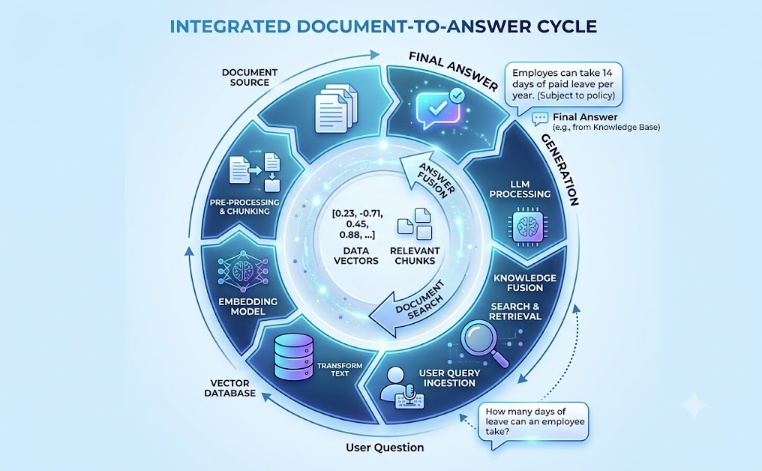
This approach is commonly called:
RAG — Retrieval-Augmented Generation
Don’t worry if RAG sounds complicated. The simple idea is, Find the right information first, then ask the AI to use that information to answer the question.
👨💼 Think of an LLM as an Intelligent Employee
Here’s another simple analogy.
Imagine your company hires an extremely intelligent employee. This employee knows a lot about technology, business, writing, and many other subjects. But you give this employee access to 10,000 company documents. You don’t expect the employee to memorize every document. Instead, you give them a smart filing system.
When someone asks, “What is our leave policy?”
The employee searches the filing system, finds the relevant document, reads it, and gives you an answer.
In this analogy:
LLM = Intelligent Employee
Vector Database = Smart Library
Embedding = Way of representing meaning as numbers
RAG = Process of finding relevant information and giving it to the AI
🚀 Why Are Vector Databases Important for Generative AI?
Traditional applications often search for, “Find documents containing these exact words.”
Modern AI applications increasingly want, “Find information that means something similar to what I’m asking.”
That’s a major difference.
For example, a user might say, “My application is running very slowly.”
The system could find documents related to:
- Performance issues
- High response time
- Database bottlenecks
- API latency
- Server overload
Even if the exact phrase “running very slowly” does not appear in those documents. That’s the power of semantic similarity.
🧩 One Important Concept: Embeddings
If you are learning vector databases, there is one word you will hear again and again:
Embedding: An embedding is a numerical representation of information that captures its meaning or characteristics.
For example:
The embedding model is essentially saying, “I’ll represent the meaning of this sentence mathematically.”
The vector database then stores these representations and helps find similar ones.
📚 Five Things to Remember
As a beginner, you don’t need to understand the mathematics behind vector databases immediately.
Start by remembering these five concepts:
1️⃣ Embedding – Converts information into a numerical representation that captures its meaning.
2️⃣ Vector – The numerical representation produced by the embedding process.
3️⃣ Vector Database – A database designed to store vectors and efficiently search for similar vectors.
4️⃣ Similarity Search – Finds information that is similar in meaning, rather than simply matching exact keywords.
5️⃣ RAG – Retrieves relevant information from your data and provides it to an LLM so the LLM can generate a more useful answer.