
Your company implemented AI. Your teams are using it. Your reports are faster, your code is generated quicker, and your meetings are summarized automatically. So why is the project still taking the same amount of time?
This is becoming one of the biggest questions for organizations investing in AI.
Companies are implementing Generative AI, AI coding assistants, automated testing, AI-powered project management tools, intelligent reporting and AI agents. Employees are being trained to use these tools, and leadership expects measurable productivity improvements.
But in many IT projects, the expected improvement is not visible.
The reason is simple:
AI can make tasks faster, but it cannot automatically fix a broken process.
If the underlying delivery process is slow, fragmented, dependent on multiple teams or full of unnecessary approvals, AI may simply help people perform those inefficient processes faster.
That is why organizations need to move from AI adoption to AI-driven process transformation.
AI Is Not a Productivity Strategy by Itself.
Consider a typical IT project.
- The developer uses AI to generate code.
- The tester uses AI to create test cases.
- The business analyst uses AI to summarize requirements.
- The project manager uses AI to prepare status reports.
- Everyone is using AI.
Yet the release is still delayed. Why?
Because software delivery is not about individual tasks. It is about the entire delivery chain:
Requirement → Development → Testing → Defect Resolution → Approval → Deployment → Feedback
If one critical part of this chain remains slow, improvements in other areas may not significantly improve overall productivity.
For example, a developer may complete a feature 30% faster using AI. But if the tester receives the required test data three days late, the project has not necessarily gained three days of productivity.
This is the difference between task productivity and end-to-end productivity.
The Hidden Productivity Killer: Waiting
One of the biggest productivity problems in IT projects is not the time employees spend working.
It is the time they spend waiting.
- A developer may need six hours to develop a feature but wait two days for an API specification.
- A tester may complete testing in four hours but wait three days for test data.
- A project manager may prepare a report in 20 minutes using AI but spend two hours collecting updates from different teams.
- A business analyst may complete requirement analysis quickly but wait several days for business approval.
AI reduces execution time. But if waiting time remains unchanged, the overall project timeline may not improve.
This is why organizations should ask: Where is the project actually losing time?
Not: Where can we add AI?
Utility Industry Example: AI Is Fast, But Dependencies Are Slow.
Consider a utility company implementing a customer experience platform.
The solution includes a customer portal, mobile application, billing, usage information, registration, payment integration, notifications and SAP integration.
The organization introduces AI across the project.
- Developers use AI coding assistants.
- QA uses AI to generate test cases.
- The PM uses AI to create weekly status reports.
- Business analysts use AI to summarize meetings and requirements.
Productivity appears to have improved. But the project is still struggling to meet its go-live date.
The reason?
The biggest bottleneck is not development. It is dependencies.
For example, the application team completes a feature, but QA cannot start because the required SAP test data is unavailable.
- The SAP team is waiting for a data refresh.
- The database team is waiting for another dependency.
- The business team has not finalized a particular test scenario.
- The payment provider has not completed sign-off.
Meanwhile, the project manager spends hours chasing different teams for updates.
AI can prepare the project status report in seconds.
But the SAP dependency is still unresolved.
AI has improved reporting productivity, but not delivery productivity.
The organization has automated the reporting process without solving the underlying delivery bottleneck.
Insurance Industry Example: More Test Cases Don’t Mean Better Productivity
Now consider an insurance transformation project.
Suppose an organization is modernizing its claims management platform.
- AI is introduced across the project.
- The BA uses GenAI to create user stories.
- Developers use AI to generate code.
- QA uses AI to create test scenarios.
The PM uses AI to prepare RAID summaries and status reports.
Again, everyone is more productive at an individual level.
But during UAT, the project continues to experience delays.
Why?
Because the actual problem is requirement and business-rule ambiguity.
Consider a requirement:
“The system should automatically calculate claim eligibility.”
AI can generate dozens of test scenarios based on this requirement.
But what happens when:
- The policy has expired?
- The customer has multiple policies?
- The claim is partially covered?
- A deductible applies?
- A special endorsement exists?
- A third-party investigation is required?
AI can generate more test cases, but it cannot automatically decide what the business rule should be.
If the business requirement itself is unclear, AI may simply produce more output from incomplete input.
The team now has hundreds of AI-generated test cases that still require human validation.
The result is more activity—but not necessarily more productivity.
The AI Paradox: More Output Can Create More Work
This is one of the hidden risks of AI adoption.
AI makes content creation extremely easy.
You can generate:
- 50 test cases
- 20 user stories
- 10 risk scenarios
- Multiple project reports
- Hundreds of lines of code within minutes.
But the important question is:
How much of that output creates actual business value?
If a QA team previously created 100 test cases and AI generates 500, but the team still has the same capacity to execute and validate them, productivity may actually decrease.
AI has increased volume, not necessarily value.
This is why organizations must measure AI success through business outcomes rather than the amount of AI-generated content.
Five Reasons AI Is Not Improving Productivity
- AI Is Added to the Process Instead of Changing the Process
Organizations often take an existing process and simply add AI to it.
For example:
Old process:
Email → Meeting → Spreadsheet → Follow-up → Status Report
AI-enabled process:
Email → Meeting → AI Summary → Spreadsheet → Follow-up → AI Status Report
AI has been added.
But the process has not changed.
The better question is:
Why are we maintaining the spreadsheet at all?
If project information already exists in Jira, Azure DevOps or another system, AI should retrieve and analyze that information automatically.
The objective should be fewer steps, not simply faster steps.
- AI Adoption Is Measured Instead of Business Outcomes
Organizations often measure:
- Number of AI users
- Number of prompts
- Number of AI-generated documents
- Number of AI-assisted code commits
These metrics demonstrate adoption. They don’t demonstrate productivity.
Better metrics include:
- Reduction in delivery cycle time
- Reduction in defects
- Faster UAT closure
- Reduced requirement turnaround time
- Faster dependency resolution
- Improved release predictability
- Reduction in production incidents
- Improved customer satisfaction
The goal shouldn’t be:
“Our team uses AI.”
The goal should be:
“Our team delivers faster, with better quality and greater predictability.”
- AI Is Implemented in Silos
- Development may have an AI tool.
- QA may have another.
- Project management may use another.
- Business teams may use another.
But these systems don’t necessarily share context.
Imagine AI having access to:
Jira + Defects + Test Results + Dependencies + Release Plans + Risks + Production Incidents + Performance Data
Now AI can provide delivery intelligence.
For example:
“Based on current sprint velocity, unresolved critical defects and outstanding SAP dependencies, the planned release has a high probability of missing the target date.”
That is much more valuable than simply generating a weekly status report.
- Organizations Automate Tasks Instead of Decisions
AI is excellent at repetitive tasks.
But some of the biggest productivity losses occur because decisions are delayed.
- A critical API is slow.
- Development says it is an SAP issue.
- SAP says it is an application issue.
- Another meeting is scheduled.
- Another analysis is requested.
- Another status report is created.
- Three days later, the root cause is still unknown.
AI could potentially analyze logs, historical incidents, API response times and defect patterns to help identify the likely cause.
But organizations often use AI only to summarize the discussion. The bigger opportunity is to use AI to accelerate the decision.
- People Are Not Trained to Work Differently With AI
Giving employees an AI tool does not automatically change how they work.
Organizations need to redesign workflows around AI.
Instead of:
PM collects updates → consolidates information → prepares report → identifies risks
the future process should look more like:
Systems provide real-time data → AI detects anomalies → AI predicts risks → PM validates → PM focuses on decisions and stakeholder management
This is a fundamentally different way of working.
From AI Adoption to AI-Driven Delivery
The next level of AI maturity is not having more AI tools.
It is connecting AI with the delivery process.
For a utility project, imagine:
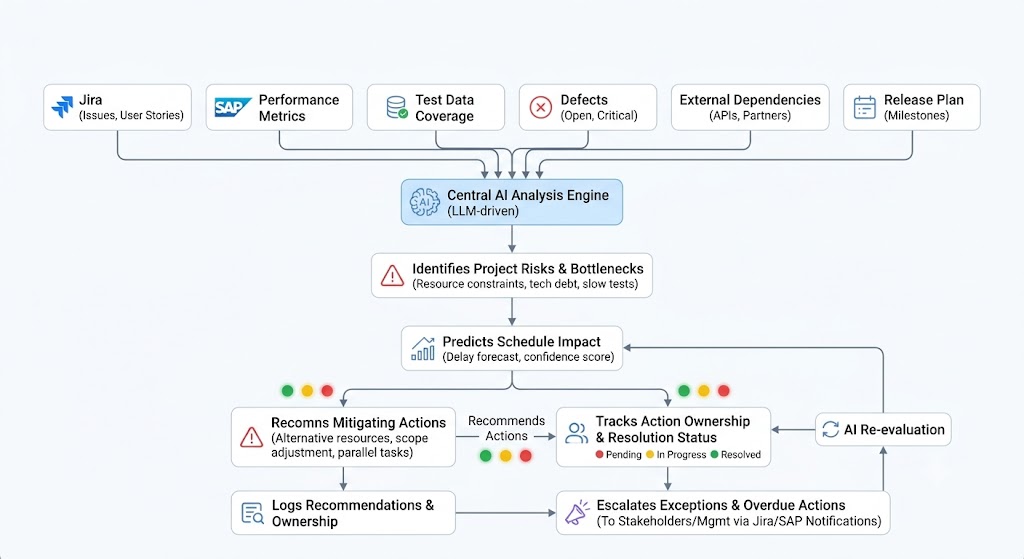
Now AI is no longer just generating content.
It is becoming part of the delivery operating model.
The same approach can be applied to insurance projects by connecting requirements, business rules, claims scenarios, defects, test results and release information.
AI could identify requirement gaps, predict high-risk stories, identify recurring defect patterns and highlight areas requiring business clarification.
That is where AI starts creating measurable business value.
AI Should Remove Work, Not Just Make Work Faster
Before implementing AI, organizations should ask three questions.
- What work should AI accelerate?
For example:
- Coding
- Testing
- Documentation
- Analysis
- Reporting
- What work should AI eliminate?
For example:
- Manual status consolidation
- Duplicate reporting
- Repetitive data entry
- Searching across multiple systems
- Manual meeting summaries
- What decisions should AI improve?
For example:
- Risk prioritization
- Resource allocation
- Release readiness
- Sprint forecasting
- Defect prioritization
- Dependency escalation
The third category represents one of the biggest opportunities for AI-driven productivity.
The Future Is AI + Process + People + Data
AI alone will not transform an organization.
The real transformation requires:
AI + Data + Process + People + Governance
- AI provides intelligence.
- Data provides context.
- Processes provide direction.
- People provide judgment.
- Governance provides control.
When these elements work together, AI can move beyond being a personal assistant and become an organizational productivity engine.
Conslusion
If your organization implemented AI months ago and productivity has not improved, don’t immediately conclude that AI doesn’t work.
Ask a different question: Are we using AI to automate tasks, or are we redesigning the way work gets done?
In a utility project, AI may generate a perfect status report while the team is still waiting for test data. In an insurance project, AI may generate hundreds of test cases while the underlying business rules remain unclear. In both situations, AI is working. The process isn’t.
The next phase of AI adoption should therefore focus on identifying the biggest sources of:
Waste + Waiting + Rework + Decision Delays
and redesigning those processes around AI. Because the real promise of AI is not:
“People can do more work.”
It is: “Organizations can create more value from the same amount of work.”
And that is where true AI-driven productivity begins.